

Project Overview #
MOM POS - Simple, smart, and user-friendly point-of-sale system designed specifically for restaurants.
🛑 A heads up before you try it 🛑 Since I landed a job, the MOM POS project has come to a close. The backend Docker container has been shut down (because it was actually costing me real money every month), and only the frontend deployed on GitHub Pages remains. The main APIs now return fixed values, keeping the frontend as a showcase.
Multi-functional, Cross-device Online Ordering #
MOM POS is an ordering website that allows restaurant owners to quickly and easily create and edit menus, manage customer data, while enabling customers to register as members and order online. It features RWD, permission management, and more.
A POS System Every Mom Approves 👍 #
The inspiration for this whole project came from my mom. I wanted to create a POS system that’s so simple even my mom would find it easy to use. I also wanted MOM POS to be like a mom - budget-conscious and thoughtful, helping you save time and accurately track your restaurant’s sales.
MOMPOS #
MOMPOS stands for Master of Management Point of Sale, shortened to MOM POS. (Yeah, I was going for a cool pun back then - looking back now, it’s kinda silly.)
Development Journey #
After finishing my college internship in 2024, I decided to develop a demo website during the gap before and after my mandatory military service (conscription). The goal was to use this website as part of my resume to help me land my first full-time job as a software engineer. I officially completed it around February 2025, taking about 8 months in total. What I remember most is the period before Chinese New Year - spending entire days holed up in my room during the cold winter, my desk covered with various tea drink cups. I kept this up for several weeks straight, and eventually my sleep schedule got completely messed up. I’d wake up at 3 PM every day and work until 4 AM. Maybe it was because I still hadn’t found a job yet that my routine became so chaotic.
I originally thought I could finish it within three months, but reality was harsh. From deployment onwards, it was just problem after problem. I remember one time trying to deploy Docker for a feature, and for some reason, it kept failing. I tried maybe close to 20 times, and I was on the verge of a mental breakdown. I think it was because I was developing with AI assistance without anyone to ask for help, which made me feel particularly frustrated. That was probably the closest I came to giving up on this project - you could say I had a love-hate relationship with this website.
If you ask me whether developing a website with AI is easy, I’d say it depends on your requirements. If it’s just a simple frontend-only website, deploying it on GitHub Pages might only take a few days. By 2026, with AI, you don’t even need to write a single line of code - you can finish in an hour or two. But since I was using this for job interviews, I wanted to fully plan out a product and try various skills, which is why it ended up being so exhausting.
Did this website actually help me find a job? I’m honestly not entirely sure. After all, interviews consider many things, and demo projects are just one possible topic that might come up among dozens of questions.
But my current boss at the job I eventually landed told me she specifically went and played around with my website. There were also a few interviews where HRs or managers brought up this website. When they initiated the conversation, at least I had something to talk about, and that’s when it became a bonus question I felt more confident answering. So I’d say it helped me with interviews in various invisible ways~
Technical Architecture #
What I Used #
Using frontend-backend separation:
- Frontend: Vue.js + Quasar
- Backend: C# .NET Core
- Database: MSSQL
I planned it this way because I had worked with all these technologies at my previous internship. What I experimented with more on my own was the deployment part and some design details.
Backend and Database Deployment #
- Using Docker + GitHub Actions + Digital Ocean Droplets
The backend and database each have their own container. The database interface only faces the backend, and the backend interface faces the frontend.
For Digital Ocean, I got the $12 plan. At first, I used the cheapest plan and even installed MSSQL 2022, not realizing that spec couldn’t run it 😂. Running the backend + database engine on the cheapest plan was impossible, so I later upgraded the plan and switched to MSSQL 2019.
Frontend Deployment #
- Using GitHub Pages + CloudFlare
These are all free. It’s generally impossible to hit the paid tier anyway. I bought my domain from NameCheap - economical and affordable.
Features #
Ordering UI #
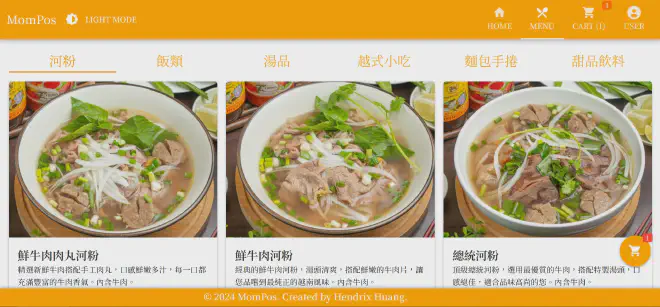
The design was inspired by various online ordering systems, among which I thought MWD’s (in Taiwan, 麥味登) app was the prettiest and simplest. While designing, I was thinking about making something even more beautiful than theirs.
Although using AI to write frontend code is already very convenient, the frontend for me is sometimes about getting the feeling right. Some details just don’t feel right, and I still have to spend quite a while adjusting them.
Member System #
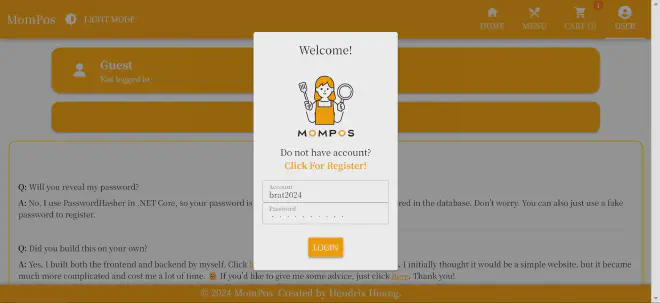
Member login system
Basically, cookies are used to maintain login status. After logging in, an encrypted token is stored, and middleware is used to ensure specific APIs have key verification. Actual passwords are hashed after input, so there’s no security concern about storing them in plain text.
I also set up some IP-based mechanisms to prevent login spam. If you attempt to log in 15 times within 30 minutes, you’ll be locked out for two days.
By the way, the shopping cart contents are also stored using cookies.
Menu Editor #
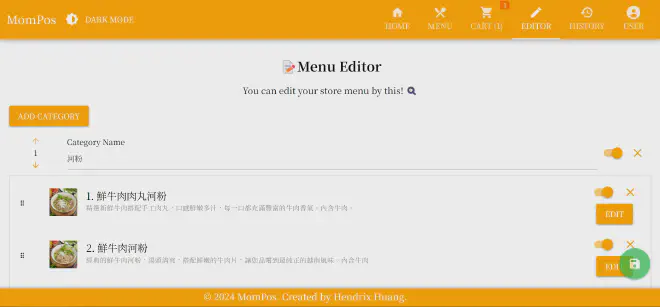
Admin menu editing functionality
🔗 Click to enter the menu editor
I must have been crazy to come up with this idea.
The frontend design alone caused a bunch of problems. The modal design, the save mechanism - everything was deleted and revised multiple times before barely getting it done.
I ended up deciding to put order, item deletion, and item hiding on the outer layer. If users make any of these modifications, the green save button in the bottom right will light up. Item data and images are placed in the inner modal.
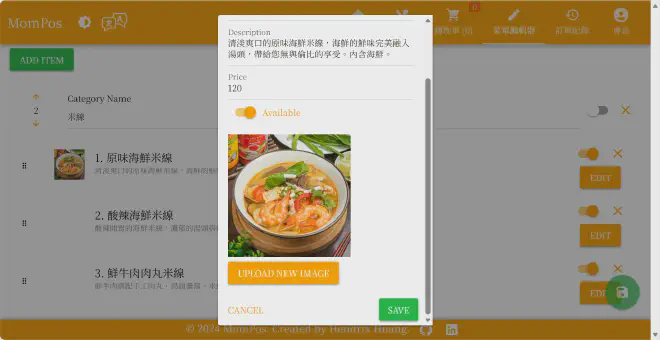
Oh right, for image uploading, I used Cloudinary’s API, so I never actually opened up this menu editor feature publicly because the risk was too great. I did think about having different permission levels for different users, where only a certain level could upload images.
If I really wanted different users to open their own shops, I’d need to design URLs for each shop and ensure no cross-shop access. I’d also need to consider if anyone might maliciously spam APIs - the workload would be enormous.
But thinking about it, would anyone actually use my demo website that deeply? If they did, they should just contact me directly and I’ll demo it for them live 🤣.
Anyway, this division of different user permission levels was indeed the last unfinished requirement. When I felt the website was mature enough, I stopped developing and started sending out resumes for interviews.
Other Quirky Designs #
- Dark mode: When turned on, it puts sunglasses on mom
- Logo: I designed it using modified images from a Japanese copyright-free material site
- Color scheme: I think orange-yellow is the most appetite-inducing color
- i18n: Multi-language design is cool, but more troublesome than I imagined
- Top toolbar: You’d never guess how much time I spent designing this. AI just doesn’t understand aesthetics, but CSS is really annoying - I had to adjust it slowly.
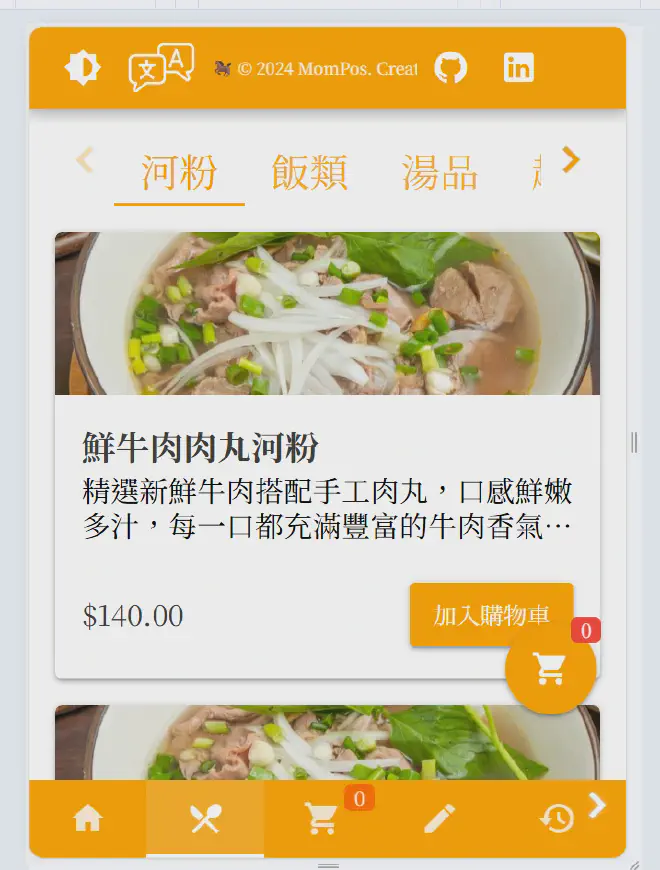
- RWD: If you use the mobile version, you’ll find it’s completely different. I always felt menu buttons should be at the bottom for phones (easier to tap) but at the top for web pages.
- Bottom author bar: If you use the mobile version or shrink the window, you’ll see a marquee.
Database Design #
Object Relationship Design #
Is it Many-to-Many or One-to-Many? #
The relationship between menus, categories, items, and customization options - I thought about this part of the design for a long time, especially the database design. Back then, I was still a newbie, unsure whether the relationship between each food item and its customizations should be one-to-many or many-to-many. Maybe it’s because I was used to drinks having options like no ice/light ice/normal ice that could be shared, so I kept thinking of it as a many-to-many relationship.
Another reason was that I had used Uber Eats’ backend, and they indeed can set up a group of customization options and apply them to different products, so I really wanted to learn from that. But considering this took too much time and was too complex, I couldn’t even design the database tables properly. Later I changed it to a one-to-many relationship, which was simpler.
Object Design #
The objects are:
- Menu (MenuConfiguration): The same restaurant can design multiple menus but only use one at a time (referenced from Uber Eats’ backend)
- Category: Different categories like rice/soup/desserts
- Menu Item (MenuItem): An actual dish
- Menu Item Options (MenuItemOptions): Specific option details for each dish, like no spicy/less sugar, etc.
The relationships are:
Menu MenuConfiguration (1) ──→ (N) Category
Category (1) ──→ (N) Menu Item MenuItem
Menu Item MenuItem (1) ──→ (N) Menu Item Options MenuItemOptions
Additionally, there are simpler ones:
- UserInfo: User registration data
- RegisterInfo: User account and password for first-time registration, password is hashed
Everything was fine up to this point, but once I added Order, I got dizzy. To make it more intuitive, let me just paste the backend objects:
Order Object Design #
public class Order
{
    [Key]
    public int OrderId { get; set; }
    public DateTime OrderDate { get; set; }
    public decimal TotalAmount { get; set; }
    public required ICollection<OrderItem> OrderItems { get; set; }
    public int UserInfoId { get; set; }
    public UserInfo? UserInfo { get; set; }
}

public class OrderItem
{
    [Key]
    public int OrderItemId { get; set; }
    public int OrderId { get; set; }
    public Order? Order { get; set; }
    public int MenuItemId { get; set; }
    public MenuItem? MenuItem { get; set; }
    public int Quantity { get; set; }
    public decimal TotalPrice { get; set; }
    public decimal UnitPrice { get; set; }
    public string Options { get; set; } = string.Empty;
}
So Order contains N OrderItems, where Order aggregates the entire order, and OrderItems are associated with it.
What stuck me most was the concept of OrderItem. In the end, I went with:
Same product + Same options = One OrderItem
Meaning:
- Three pho, spicy flavor = One OrderItem
- Three iced coffees, two with no ice (one item), one with extra ice (one item) = Two OrderItems
This design considered that some options might affect the price - like adding ice might cost an extra five dollars.
Actually, the challenging part of making these designs was that I didn’t have a clear PO or client defining requirements, so I had to control the difficulty and value myself. Otherwise, I’d keep thinking more and more, making it more and more complex.
Conclusion #
That’s pretty much it. By the end, I really developed some revolutionary feelings for my website/product. Showing it to friends felt like having a kid perform their talents in front of elders XD (Look, look, he can do this!). I originally thought I’d shut down the website as soon as I found a job, but it took half a year before I finally did.
Being angry at code, frustrated, happy, moved - it’s a really strange feeling, but this website is indeed my baby. I’m not saying it’s something many people can actually use or that the technology is super impressive. If you want to compare, check out the Stardew Valley creator’s story - just making a resume as an engineer ended up creating a bestselling game.
But I think this website is very meaningful to me. It witnessed me from my toughest times to getting my first full-time job.
I’m writing this to commemorate this journey, and I hope it can give some reference to those looking for work or wanting to develop a demo website, or give some encouragement to those currently developing demo websites. If you’ve made it this far, I want to give you a special heads up: don’t just focus on building a demo website. You need to prepare everything for interviews - behavioral questions, LeetCode, resume design - all of it. Honestly, a demo website is not more important than these other things. Anyway, keep at it and good luck!